Views
Alarm Management Software Benefits: 4 Steps to Unlock Them
AUGUST 2025
Many organizations invest in Alarm management software to meet compliance needs or generate monthly reports, but that’s just scratching the surface. When used proactively, this software can reduce operator workload, consolidate alarm data across systems, and minimize costly downtime.
Alarm management software has the potential to improve plant performance every day, not just at audit time.
Yet in my conversations with plant personnel, it’s clear that many still underutilize their systems. They’re missing key opportunities to improve operations, reduce stress, and boost productivity.
This article outlines four simple ways to make your alarm management software work for you, not the other way around.
Many users simply aren’t getting the value they should be from their alarm management software, and this means that many companies are missing opportunities to improve their outcomes.

The best approach to alarm management is to make it part of your daily routine. This is what best-in-class users do.
It doesn’t have to be onerous. In fact, using your alarm management software every day helps you identify and resolve issues before they become bigger problems.
The benefits include:
Less operator stress: Fewer unnecessary alarms create a more manageable working environment.
More proactive operations: Operators can spend less time reacting to alarms and more time monitoring and improving the process.
Fewer interruptions: Identifying alarm issues early can help prevent avoidable downtime.
Better plant performance: More reliable operations can improve productivity and reduce costs.
The goal is simple: make your software work harder so your operators don’t have to.
This means fewer process interruptions and potentially, fewer regulatory breaches. Needless to say, the plant will also be more productive, and therefore more profitable too.
4 Steps to Unlock the Benefits of Alarm Management Software
-
Step 1: Understand What Your Alarm Management Software Can Really Do
This may sound obvious but understanding the capability of your software is a quick route to extracting value from it.
For example, good alarm management software should include built-in reporting capabilities.
ProcessVue Analyser can automate daily alarm reports and email them to the relevant teams. This makes it easier to monitor alarm performance without spending time compiling reports manually. -
Step 2: Make Alarm Management Software Part of Daily Discussions
Morning meetings often focus on production targets, losses, maintenance issues and operational challenges.
Alarm performance should be part of that discussion too.
Reviewing alarms daily helps teams identify problems earlier and reduces the risk of unresolved issues causing disruption.
You don't need to review every alarm. Start with a manageable set of priorities:
- The 10 most frequently occurring alarms.
- The five alarms causing the greatest disruption.
- Any alarm with more than 500 activations in 24 hours.
Choose criteria that suit your operation and automate the reporting.
A few minutes spent reviewing alarm performance each day can prevent much longer discussions about avoidable downtime later. -
Step 3: Track Alarm Issues and Resolutions with Your Team
Operators use the alarm system every day, so their involvement is essential to improving its performance.
I've spoken to many operators who have reported the same alarm problems repeatedly, only to find that nothing changes.
This is why tracking issues and resolutions matters.
A simple process can make a difference:
- Record alarm problems reported by operators.
- Assign responsibility for investigating them.
- Track the actions taken.
- Share the results with the team.
When operators see that their concerns lead to improvements, they're more likely to speak up.
It also gives teams a reason to take pride in improving alarm performance and productivity. -
Step 4: Identify and Fix High-Frequency Alarm Problems Fast
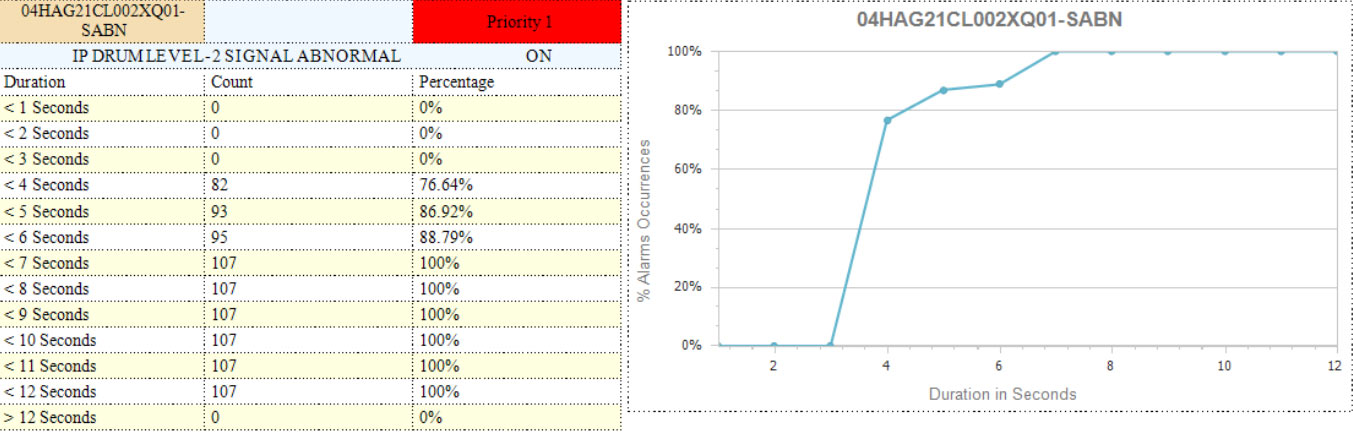
Identify quick wins in your most frequent alarms and deal with them - your operators will thank you. ProcessVue Analyser includes a tool as standard to help identify quick wins, which gives a graphical and tabular indication of alarm activation times.
ISA-18.2 provides useful benchmarks for alarm system performance:
- Alarm flood threshold: More than 10 alarms in 10 minutes per operator position.
- Recommended performance target: The alarm system should spend less than approximately 1% of its time in an alarm flood.
That 1% represents around 15 minutes per day.
Nuisance alarms contribute to unnecessary alarm activity and can make these targets harder to achieve.
That's why I'd rather identify and address them now than wait for an audit to highlight the problem.
In the example above, the table and chart show that 100% of activations of this Priority 1 alarm lasted less than seven seconds.
Short-duration alarms can sometimes result from temporary process conditions, such as waves or ripples on a liquid surface.
These brief activations may not give operators enough time to respond.
One possible improvement would be to investigate whether a 10-second alarm delay could reduce unnecessary activations.
However, any change must be assessed against the alarm's purpose, response time and safety requirements before implementation.
Finding and resolving issues like this is easy when your software is designed to help you.
Making alarm management part of your daily routine doesn’t need to be difficult or time-consuming.
By using your software proactively, you can identify problems earlier, reduce unnecessary alarms and improve plant performance.
Otherwise, the software can end up controlling your working day. Operators spend more time responding to alarms, investigating failures and dealing with avoidable downtime.
Your alarm management software should make your job easier, not harder.
Take Control of Your Alarm Management Software, Don’t Let It Control You
If you feel that your alarm management software is bossing you, rather than the other way around, get in touch, or try the four steps above and let me know how you get on.
Once you’ve got these daily habits in place, our Alarm Rationalization service and ProcessVue Guardian can help you take it further.
Grounded in Recognised Standards
None of this is just my opinion, either.
These four steps reflect established good practice in alarm management.
Standards and guidance such as ISA-18.2, EEMUA 191 and IEC 62682 emphasise the importance of monitoring alarm performance, identifying recurring problems and managing improvements.
For more detail, our Alarm Management Standards & Guidelines resource explains the requirements and recommendations of each.
FAQ: Alarm Management Software
Q1: What is Alarm Management Software?
A: Alarm Management Software is a tool used in industrial environments to monitor, analyze, and manage alarms from various systems. It helps operators prioritize alerts, reduce alarm fatigue, and improve overall plant efficiency.
Q2: What are the main benefits of alarm management software?
A: The main benefits of alarm management software include:
Reducing nuisance alarms and operator workload.
Identifying recurring alarm problems.
Improving plant reliability and reducing avoidable downtime.
Supporting compliance with alarm management standards.
Providing better operational information for decision-making.
Regular monitoring and reporting help organisations achieve these benefits.
Q3: Why is it important to resolve nuisance alarms quickly?
A: Nuisance alarms can overwhelm operators, cause delays, and hide critical alerts. Addressing them quickly reduces stress, downtime, and risk.
Q4: What features should I look for in a good Alarm Management Software?
A: Look for automated reporting, alarm frequency analysis, integration capabilities, and tools to filter and group alarms by type, duration, and priority.
Q5: Is Alarm Management Software only for compliance?
A: No, while it helps with compliance, its true value is in improving operations, reducing downtime, and enabling better decision-making.